Introduction
Build firmware locally, run it on OnMCU, and get the result back in your own tools.
You build firmware with your own compiler, source tree, and editor. OnMCU finds a matching board, flashes it, and returns its logs and result.
How it works
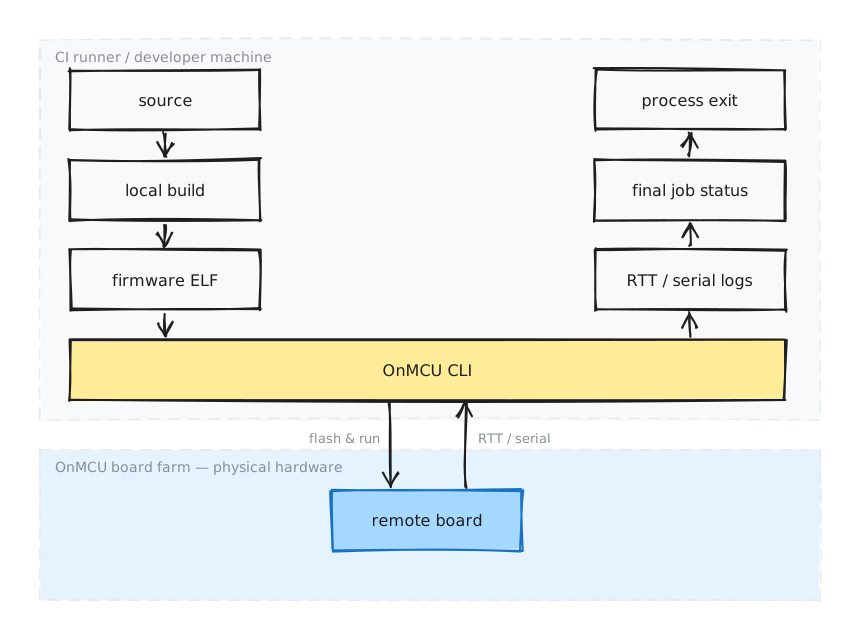
The ELF goes to the board. Logs and the final result come back to your shell, editor, or CI runner.
Quick start
Install the CLI and run a firmware image on a board.
Webapp
Manage API keys and view or cancel jobs.
Firmware logging
Choose RTT or a serial UART for output.
Semihosting exits
Stop a run as soon as the device has a result.
What OnMCU handles
- finds an available device that matches the board part number;
- uploads and flashes the firmware;
- captures RTT, including
defmt, or a serial UART; - watches for a semihosting exit from the MCU;
- records whether the job completed, failed, was cancelled, or timed out; and
- returns that result through the CLI and GitHub Action.
What stays in your project
- Choose the target triple, linker script, and chip settings.
- Link an RTT or serial logger into the firmware.
- Define when tests pass or fail.
- Signal a clean exit when the application or tests finish.
For working firmware projects, see rust-examples and c-examples.